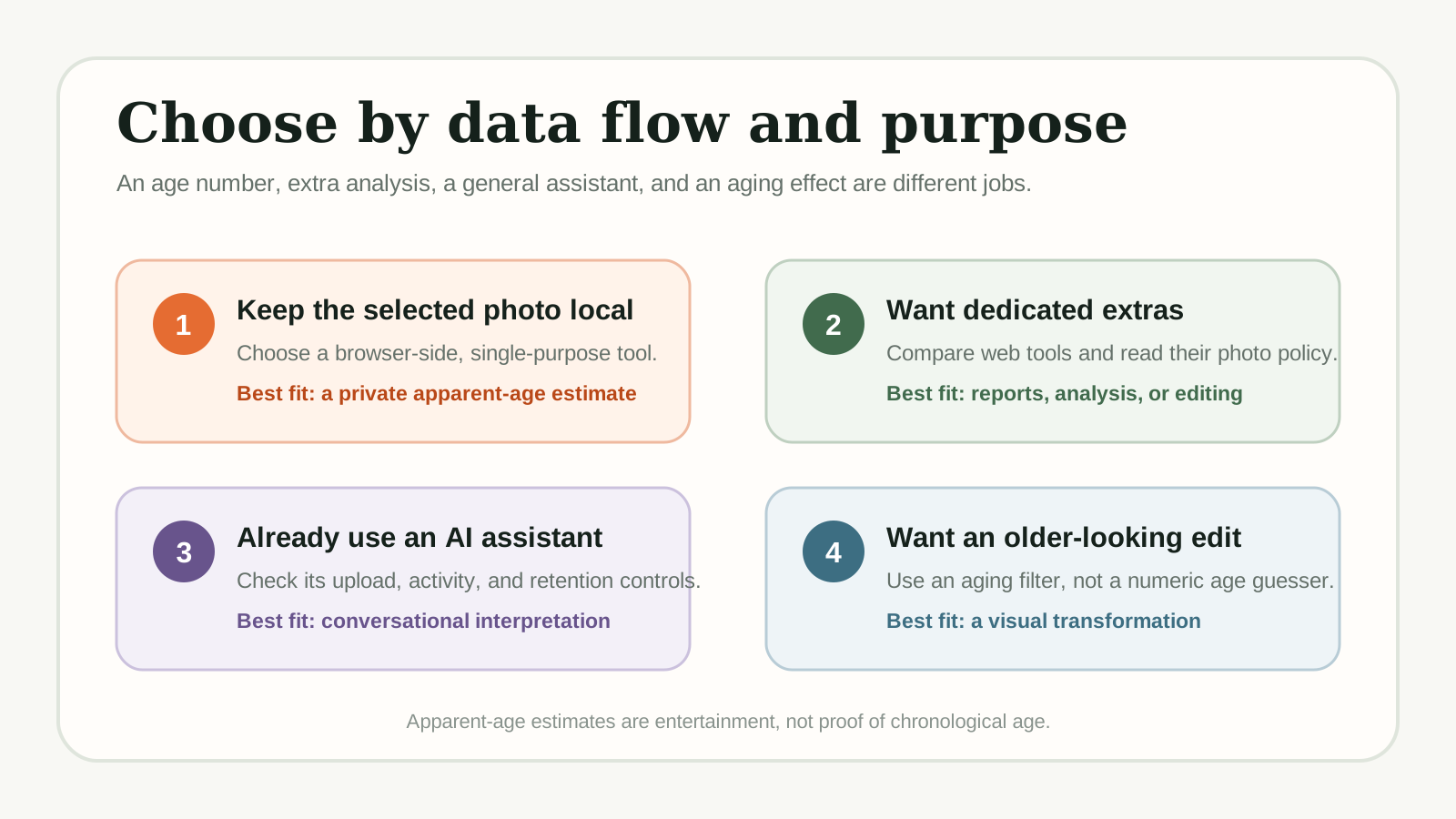
There is no single best AI age guesser for everyone. Choose GuessMyAgeFromPhoto if you want a browser-side number without sending the selected photo to an age-estimation server. Choose a dedicated web service for extra reports, Fotor for an editing workflow, a general AI assistant for conversation, or FaceApp when you want an aging effect rather than a numeric estimate.
Upload one portrait to three tools and you may get three different answers. That does not reveal which service knows your real age: each product can use a different model, face crop, label set, and output style. The practical comparison is therefore not a league table of supposedly exact ages. It is a decision about what you want the tool to do and what happens to the selected image.
How this comparison was made: GuessMyAgeFromPhoto publishes this article and is one of the tools discussed. We reviewed official product and privacy pages on July 30, 2026. We did not upload one face to every service, and this is not a controlled accuracy or speed benchmark. “Best” below means best fit for a stated scenario.
Quick comparison of dedicated AI age guessers
The table focuses on access and each provider's current disclosure. “Free” can mean a free basic result while optional reports, premium filters, accounts, or plan limits still apply.
On a phone, swipe horizontally to compare all columns.
| Tool | Free access? | Photo handling | Mobile path | Best fit / extras |
|---|---|---|---|---|
| FaceAge.ai | Yes; paid report optional | Uploaded to FaceAge server memory and sent to OpenAI's API; FaceAge says its server copy is discarded after the result | Mobile web | Age result plus optional harmony report |
| HowOldDoYouLook | Basic result free | Privacy policy says temporary server memory, then discarded† | Mobile web | Basic and advanced modes |
| GuessMyAgeFromPhoto | Yes | Browser-side; no age-estimation server upload | Mobile web | Private, single-purpose estimate |
| Fotor | Age page says free | Uploaded; age page says deleted after refresh or leaving | Mobile web | Face analysis and photo editing |
† HowOldDoYouLook's privacy policy states photos are processed in memory then discarded, but its terms of use grant broader rights over user content without explicitly excluding photo uploads. Review both documents before uploading.
Want to skip the comparison and just try one? Upload a photo to GMFP now → — it's free, no sign-up, and your photo stays on your device.
What each dedicated AI age guesser is best at
1. FaceAge.ai: a dedicated web result with optional extras
FaceAge.ai is a dedicated web age estimator. Its product page presents the basic experience as free and without sign-up, with support for phones, tablets, and desktop browsers. The main strength is focus: a visitor can ask for an age result and then choose whether an optional paid harmony report is useful.
FaceAge's privacy policy says an uploaded photo is processed in its server memory and sent to OpenAI's API. FaceAge says it does not save the photo to disk or a database and discards its server copy after returning the result. Its OpenAI API retention configuration is not disclosed.
2. HowOldDoYouLook: an explicit temporary-server workflow
HowOldDoYouLook.com offers a free basic age prediction without requiring a login. Its useful strength is a more explicit description of the photo path than many one-page tools provide. The service also mentions basic and advanced modes, although advanced availability or account requirements can vary.
The site's privacy policy says a photo is uploaded to its server, processed in memory, and discarded after the result instead of being saved persistently. That is temporary server processing, not browser-side processing. Its Terms use broader language about service content, so read both documents if legal wording is important to your choice.
3. GuessMyAgeFromPhoto: a browser-side, single-purpose estimate
GuessMyAgeFromPhoto loads the face-analysis code and model into the browser, then analyzes the selected photo in the current page session. The application is designed not to send that image to an age-estimation server. It is free, requires no account, and works in a mobile browser, which makes it a direct option when you only want an apparent-age number.
The tradeoff is its narrow scope. It does not offer skin analysis, beauty scores, aging filters, or a conversational assistant. Browser-side also describes the photo-estimation path, not the entire website: hosting, analytics, and advertising can still process ordinary technical or page-use data. The site's privacy policy explains that boundary, while AI age guesser vs real age explains why the number is not verified age.
4. Fotor: an age tool inside a broader editing workflow
Fotor's How Old Do I Look tool sits inside a larger photo-editing platform. Its page presents the age result as free and without sign-up, while the wider product offers face analysis and image editing. That makes it practical for someone who wants to continue retouching, cropping, or creating after receiving a result.
The age-tool page says the uploaded photo is automatically deleted after the visitor refreshes or leaves. Fotor's broader privacy policy also explains that some AI inputs may go to selected model providers. Keep the product-page promise narrow: it describes deletion for this flow, not proof that every Fotor AI feature runs locally or uses the same provider path.
Beyond age guessers: general AI tools that can estimate age
ChatGPT and Gemini can analyze uploaded images, but they are general assistants rather than dedicated, calibrated age estimators. Answers can vary, access limits change, and each provider has separate upload, activity, retention, and temporary-chat controls. OpenAI explains model-improvement opt-outs and Temporary Chat, while Google explains Gemini Activity and temporary-chat handling.
FaceApp is another adjacent option: its aging filters create an older- or younger-looking edit instead of a numeric estimate. Its privacy policy describes cloud processing and says cached photos are deleted within 24–48 hours after the last edit. Use it for a visual transformation, not evidence of apparent or chronological age.
Which AI age guessers are actually free?
The four dedicated options have a free path, but the paths are not equivalent. GuessMyAgeFromPhoto is a free single-purpose estimate. FaceAge.ai offers a free result with an optional paid report. HowOldDoYouLook presents a free basic mode. Fotor's age page is free while its broader platform contains other services. Adjacent assistants and editing apps have separate access limits or premium features.
Which tools keep your face photo more private?
“Private” is not one switch. Separate three questions: where the selected photo is analyzed, how long a provider retains it, and whether account or activity settings allow additional uses. The most direct architecture in this comparison is browser-side processing: GuessMyAgeFromPhoto analyzes the selected image in the page rather than sending it to an age-estimation server.
Temporary server processing is a different but explainable model. HowOldDoYouLook says it processes uploads in server memory and discards them after the result. Fotor says the age-tool upload is deleted when the page is refreshed or left. FaceApp describes a longer cloud cache window. FaceAge says an upload is processed in its server memory and sent to OpenAI's API; FaceAge says its server copy is discarded after the result, while its OpenAI API retention configuration is not disclosed.
General assistants require another layer of choice because upload history, model-improvement settings, temporary-chat modes, and retention rules can depend on the account and product. Read the exact controls before sharing a face photo. For a more complete checklist, see Is it safe to upload a face photo to an AI age guesser?
Privacy shortcut: “Not stored” does not necessarily mean “never uploaded.” Look separately for the processing location, deletion timing, reuse rules, and third-party providers.
AI age guesser FAQ
What is the best free AI age guesser?
There is no universal winner. Choose by your goal: a browser-side number, a dedicated web report, an editing workflow, a general AI assistant, or an aging effect. Treat every result as an apparent-age estimate rather than proof.
Do free AI age guessers upload your photo?
Some do and some do not. A browser-side tool can analyze the selected image on your device, while other services upload it for temporary or cloud processing. Read the product and privacy pages for the exact data flow.
Can ChatGPT or Gemini guess age from a photo?
They can analyze uploaded images and may offer an apparent-age opinion, but they are general AI assistants rather than dedicated or calibrated age-estimation tools. Their answers can vary, and their upload and activity controls differ.
Is FaceApp an AI age guesser?
FaceApp is mainly a photo editor with aging filters. It can create an older- or younger-looking version of a face, but that visual transformation is different from returning a numeric apparent-age estimate.
Verdict: choose the tool that matches the job
For a browser-side number
Use GuessMyAgeFromPhoto when you want a focused apparent-age estimate without an age-estimation server receiving the selected image.
For a dedicated report
Consider FaceAge.ai or HowOldDoYouLook, then compare their current extras and photo-handling disclosures before selecting a file.
For editing or effects
Use Fotor when editing is the next step, or FaceApp when the actual goal is an older- or younger-looking transformation.
For a conversation
Use ChatGPT or Gemini if you already understand their upload controls and want follow-up discussion rather than a dedicated score.
No option can prove chronological age from one portrait. Use a permitted adult photo and treat every number as an entertainment-oriented apparent-age estimate.