It depends on how the AI age guesser handles your photo. Some tools send the selected image to a server for analysis. Others run the estimate inside your browser. Browser-side processing avoids sending the image to an age-estimation server, but it does not automatically mean that the entire website collects no technical data.
Before choosing a tool, look past words such as "AI," "free," and "private." The useful questions are more concrete: Where is the photo analyzed? Is it uploaded? Is it retained? Is it reused for training or another purpose? Which hosting, analytics, or advertising services are present?
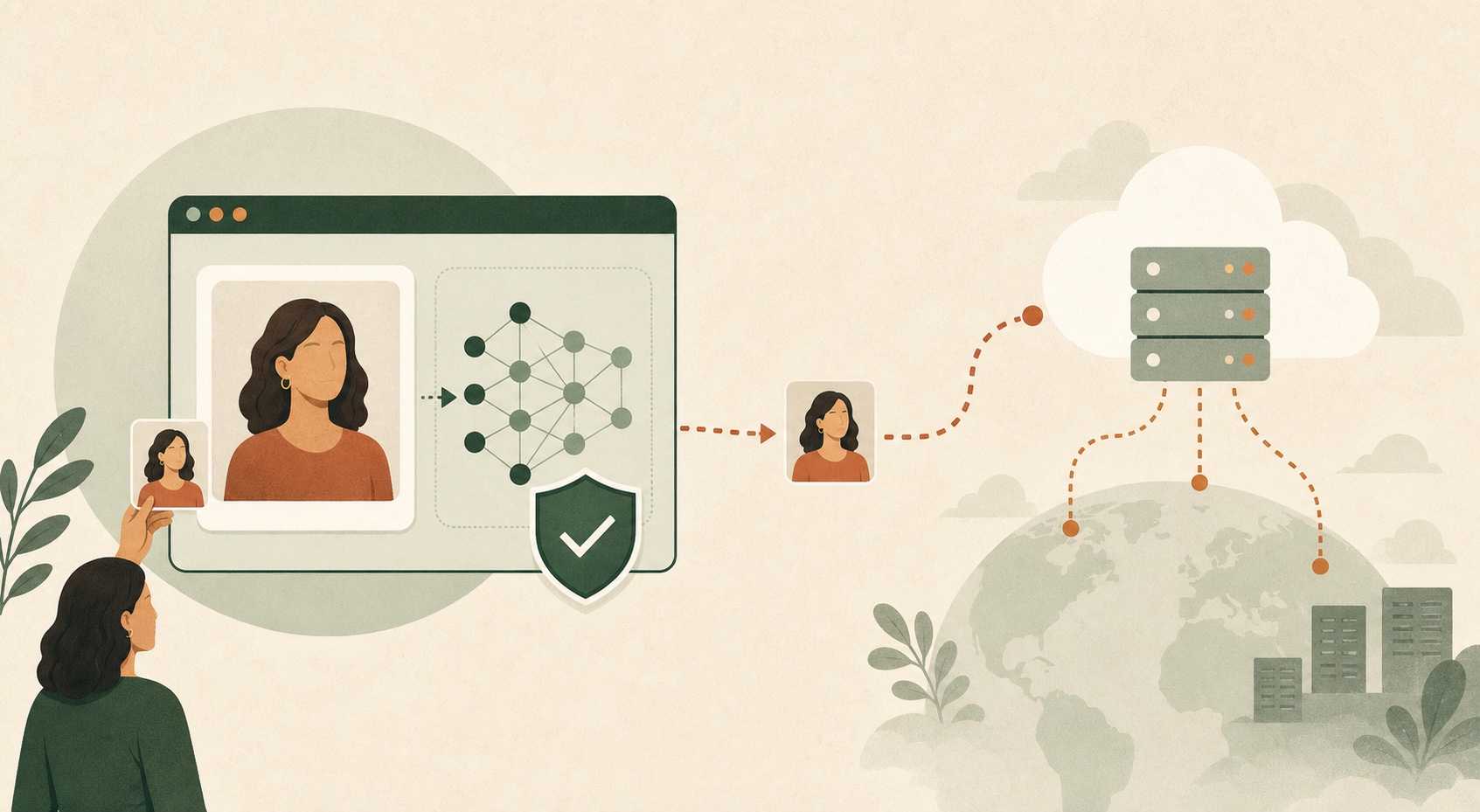
What can happen after you choose a face photo?
The upload button alone does not reveal the architecture behind a tool. In everyday language, people often say "upload" whenever they select a file. Technically, selecting a photo can lead to several different processing paths.
| Processing pattern | Where the age estimate runs | What to check |
|---|---|---|
| Browser-side processing | The image is read and analyzed in the current browser session. | Whether the application code sends the image elsewhere and what other page services collect. |
| Temporary server processing | The image travels to the provider's server, which returns a result. | Deletion timing, temporary storage, logs, subprocessors, and backup behavior. |
| Stored or reused server processing | The server analyzes the image and may keep it or derived data. | Retention, model training, account history, sharing, deletion controls, and permitted uses. |
Browser-side processing
A browser can read a file that you deliberately select and create a temporary object URL that refers to that local file. The MDN File API guide documents this local-file flow. A model loaded into the page can then analyze the image without requiring an age-estimation server to receive it.
That architecture removes one important data transfer, but it is not proof by itself. The same webpage can still load fonts, code, model files, analytics, advertising, or other third-party resources. Browser-side should describe where the selected image is analyzed, not serve as a vague promise that nothing ever leaves the device.
Temporary server processing
A cloud tool may upload the photo, run the model remotely, return an age result, and then delete the file. That can be a legitimate design, but the provider must explain what "delete" means: immediately after inference, after a fixed retention period, or only after a user request. Logs, caches, backups, and third-party infrastructure may have separate rules.
Stored or reused server processing
Some services save inputs so users can revisit results, synchronize an account, improve a model, moderate abuse, or create a public gallery. Those features are not automatically unsafe, but they create a larger trust decision. The policy should clearly describe why the image is kept, for how long, who receives it, and how deletion works.
"Not stored" does not always mean "not uploaded"
This distinction is the fastest way to read an AI photo tool's privacy language. A provider can truthfully say it does not store photos while still receiving each photo temporarily on a server. Conversely, a browser-side tool can avoid that server upload but still collect ordinary page-use data.
| Privacy claim | What it may mean | What it does not prove |
|---|---|---|
| Processed in your browser | Analysis can happen on your device. | The page collects no other technical or usage data. |
| We do not store photos | The provider says it does not retain the file. | The photo was never uploaded or temporarily held. |
| Deleted after processing | A server may remove the file after analysis. | The server never received the image, created logs, or used a subprocessor. |
| No account required | You can use the tool without an account identifier. | No cookies, analytics, IP processing, or server requests occur. |
| Encrypted | Data may be protected in transit or storage. | The service does not collect, retain, or reuse it. |
| Free | No payment is required. | Anything about the photo data flow or business model. |
How GuessMyAgeFromPhoto handles your selected image
For the current GuessMyAgeFromPhoto age guesser, the selected image is read and analyzed in your browser session. The page loads the face-analysis library and model files, creates a local browser reference to the image, detects one face, maps landmarks, and produces an apparent-age estimate in the page.
The application is designed not to send the selected image to an age-estimation server or store it on this site's server. The image and result remain in the current page state. Refreshing or closing the tab clears that state from the page. You can read the fuller implementation explanation in How AI age detection works.
A precise privacy boundary: the selected photo is not uploaded for the age estimate. This is narrower and more useful than claiming that the whole webpage is offline or sends no data.
What browser-side processing does not promise
GuessMyAgeFromPhoto is still a website. Its pages and model files must load over the internet. Hosting infrastructure may process technical information such as an IP address, requested page, browser type, device type, referrer, timestamp, and error logs.
The site also uses Google Analytics, Microsoft Clarity, and Google advertising technology. These services may process ordinary page-use or technical information, and they are separate from the browser-side age-estimation flow. The privacy policy states that selected photos and age-analysis values must not be intentionally included in analytics or advertising data; it also explains the current disclosures and retention boundaries.
Google's documentation says a default Analytics implementation can collect user counts, session statistics, approximate location, and browser or device information. Microsoft's Clarity documentation describes collection of page and interaction events used for behavioral analytics. This is why "the photo is analyzed locally" and "the page uses analytics" can both be true.
A privacy checklist for any AI age guesser
Use these questions before selecting a face photo:
- Where is the image processed? Look for a specific answer such as "in your browser" or "on our servers."
- Is it uploaded? Do not treat "not stored" as an answer to this separate question.
- How long is it retained? Look for a period and whether logs, backups, or account history differ.
- Is it reused? Check for model training, product improvement, public galleries, moderation, or advertising uses.
- Which third parties are involved? Review hosting, analytics, advertising, and age-processing providers.
- Can you clear it? Find out whether refreshing, deleting a result, or closing an account removes the current image and stored history.
- What is the result allowed to do? A trustworthy entertainment tool should say that an age guess is an estimate, not proof.
How to inspect a no-upload claim
Technically curious users can use the Network panel in browser developer tools to see requests made while a photo is selected and analyzed. Chrome's official Network activity guide explains how to record and inspect requests.
- Open the Network panel, reload the page, and clear the existing request list.
- Select a test image that contains no sensitive information.
- Run the estimate, then inspect Fetch/XHR requests, request payloads, image requests, and third-party events.
- Look for the image bytes, a base64 version, the file name, or age-analysis values in outgoing requests.
This is a useful observation of one session, not an independent security audit or a guarantee about future versions. A clear privacy policy and restrained product claims still matter.
Why face-photo privacy deserves care
A digital face photo is not automatically classified as biometric data under every law. For example, the UK Information Commissioner's Office distinguishes an ordinary photograph from technical processing used to uniquely identify a person. The legal classification depends on the system, purpose, and jurisdiction.
The practical rule is simpler: treat a face photo as personal. It can reveal identity, location, relationships, surroundings, or other context beyond a face. The US Federal Trade Commission has also warned businesses against misleading claims about biometric technologies and highlighted the security risks created by large stores of biometric information.
Use your own adult photo or one you have clear permission to use. Avoid submitting another person's image, especially a minor's image, merely to test what a tool will say.
Age estimation is not age verification
An age estimate is a numerical guess based on the visible face in one image. An age-verification system makes a higher-stakes decision about whether someone meets a required threshold. NIST evaluates those verification systems by measuring errors among underage and overage groups, not simply by asking whether one displayed number looks close.
GuessMyAgeFromPhoto provides an apparent-age estimate for curiosity and photo comparison. It is not calibrated or evaluated to decide whether someone is over 13, 18, 21, or any other legal threshold. Do not use it for identity checks, restricted purchases, access control, employment, insurance, medical decisions, or legal decisions. For more context, read AI age guesser vs real age.
The bottom line
An AI age guesser can make a more privacy-conscious design choice by analyzing the selected photo in the browser instead of sending it to an age-estimation server. That removes one meaningful transfer, but it does not replace a privacy policy, honest disclosure of analytics, careful handling of other people's photos, or clear limits on what the result means.
For any tool, ask about the actual data flow. For this tool, the product claim is specific: your selected photo is processed in the current browser session for an apparent-age estimate and is not intentionally uploaded to an age-estimation server.
AI age guesser privacy FAQ
Is it safe to upload a face photo to an AI age guesser?
It can be reasonable when the service clearly explains where the photo is processed, whether it is uploaded, how long it is retained, and whether it is reused. Browser-side processing avoids sending the selected image to an age-estimation server, but you should still review the site's privacy disclosures.
Does GuessMyAgeFromPhoto upload my photo for the age estimate?
The current tool reads and analyzes the selected image in your browser session. The application is designed not to send that image to an age-estimation server or store it on the site's server.
Does browser-side processing mean the tool works completely offline?
Not necessarily. The page, code, and model files must first load into the browser, and the site may use analytics or advertising services. Browser-side refers specifically to where the selected image is analyzed.
Does "we do not store photos" mean the image is never uploaded?
No. A service can upload a photo, process it on a server, and then delete it. Look for a separate statement explaining whether analysis occurs in the browser or on a remote server.
How do I remove my selected photo and result?
For the current GuessMyAgeFromPhoto page, refresh or close the tab to clear its current page state. Selecting another photo also replaces the previous selection in the tool.
Can an AI age guess prove someone's real age?
No. It estimates apparent age from one image. It does not know the person's birth date and should not be used for identity checks, restricted purchases, legal decisions, or age verification.
Is it okay to use someone else's face photo?
Use your own adult photo or one you have clear permission to use. Avoid submitting another person's image, especially a minor's image, without appropriate permission.
Continue exploring
Sources and further reading
- MDN: Using files from web applications
- Chrome for Developers: Inspect network activity
- NISTIR 8525: Face Analysis Technology Evaluation - Age Estimation and Verification
- UK ICO: Biometric recognition guidance
- US FTC: Misuses of biometric information and harm to consumers
- Google Analytics: Data collected by the default implementation
- Microsoft Clarity: Data collection