The best photo for AI age detection has one sharp, front-facing adult face in even natural light. Keep a comfortable portrait distance, use a relaxed expression, and avoid heavy filters, deep shadows, blur, and obstructions. Good input cannot guarantee a correct age, but it makes the result easier to interpret and repeat.
The goal is not to create the most flattering selfie. It is to give an age estimator clear, controlled visual evidence. A photo-quality checklist helps you separate model sensitivity from accidental changes in angle, crop, lighting, or editing.
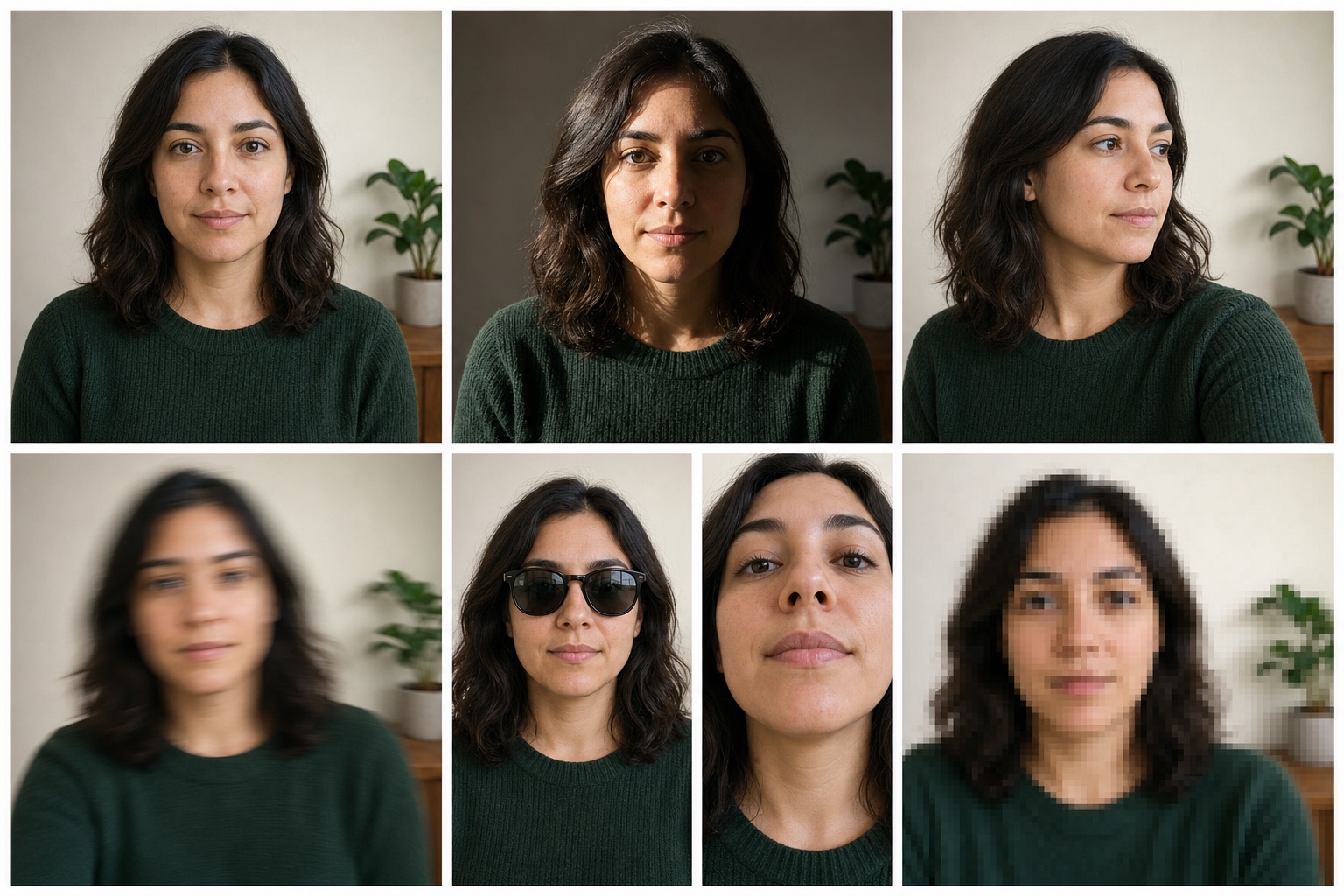
The best age detection photo at a glance
| Photo factor | Better baseline | Harder to compare |
|---|---|---|
| Face angle | Near-frontal, both eyes visible | Strong profile, tilted, or partly turned away |
| Lighting | Even daylight or soft indoor light | Deep side shadow, backlight, or colored light |
| Focus | Eyes and facial outline look sharp | Motion blur, missed focus, or aggressive compression |
| Distance | Comfortable portrait distance | Phone held extremely close to the face |
| Editing | Original color with minimal correction | Skin smoothing, reshaping, face swap, or strong filter |
| Occlusion | Eyes, nose, mouth, and jaw visible | Mask, sunglasses, hand, hair, or object covering the face |
Use one clear, front-facing face
A near-frontal portrait gives the face detector and landmark model a direct view of both eyes, the nose, mouth, jaw, and overall face shape. A strong side angle hides or compresses some of those features. Facial age estimation research explicitly treats pose and expression variation as technical challenges, especially at larger angles.
You do not need a passport-photo expression. A relaxed face with both eyes open is simply a useful baseline. If you want to test a smile, keep everything else the same and use the smile as the one changed variable.
One face works best. If a group photo contains several people, crop it to the adult you have permission to test. The tool is designed around one clear face, not a group ranking.
Choose even lighting, not a dramatic setup
Soft window light or diffuse indoor light usually preserves more visible detail across the whole face. Very dark rooms, strong backlighting, colored LEDs, and hard overhead or side light can create clipped highlights and deep shadows. These change the pixels available to the model.
That does not mean side light always makes someone look older or front light always makes them look younger. A standardized study comparing several light angles did not find a simple, statistically significant apparent-age shift across its tested conditions. The responsible conclusion is narrower: lighting changes visible cues, and controlled light makes repeated photos easier to compare.
A simple window-light setup
- Stand or sit facing a window during daylight, without direct sun on the face.
- Turn off strongly colored lamps so skin color is not mixed between light sources.
- Check that both eyes and both sides of the face retain visible detail.
- Avoid placing the bright window directly behind you, which can make the face too dark.
Once your lighting is under control, you can test how your own photo reads in even light → and compare the result with a different setup.
Keep the photo sharp and large enough
Age estimation happens after a face region is detected and aligned. If the face occupies only a tiny part of a large photo, the effective crop contains fewer pixels. If the image is blurred or repeatedly compressed, edges and texture in the original may be softened or lost.
Before uploading, zoom in on the eyes. If eyelashes, eyelids, and the face outline look smeared at normal viewing size, retake the photo. Use the original camera file when possible instead of a screenshot of a social-media preview.
Use a comfortable camera distance
Very close selfies exaggerate perspective. The parts nearest the camera appear proportionally larger, while the sides of the face recede. Research on camera-to-subject distance found that facial configuration changes with distance even when the final images are resized so the faces appear equally large.
For a neutral baseline, move the camera farther than arm's-length close-up distance and crop afterward if needed. You do not need a particular focal-length label; camera distance is the important variable for perspective. Keep that distance stable when comparing two photos.
Avoid filters and heavy editing
A beauty filter can smooth texture, reshape the jaw or eyes, change contrast, sharpen selected areas, or alter skin color. These are not invisible decorations to a model; they replace the original pixels with different evidence.
Color can also affect perceived age. A controlled study in Scientific Reports found that changing facial color information shifted human age judgments. That does not tell us how every AI model reacts, but it is a good reason to avoid treating a filtered and unfiltered photo as equivalent inputs.
Watch for occlusion and accessories
Sunglasses
They cover the eyes and nearby landmarks. Use clear lenses or remove glasses for the cleanest baseline.
Masks and hands
Anything covering the nose, mouth, or jaw removes visible facial information.
Hair and hats
Hair across the eyes or face can interrupt landmarks. A hat may also cast a strong shadow.
Facial hair and makeup
These are valid parts of your appearance. Keep them consistent when testing the effect of another variable.
Do not read a changed result as a judgment about the accessory itself. The model is simply receiving a different image.
Crop the face without cutting it off
Leave the full forehead, chin, and both sides of the face visible. A head-and-shoulders crop is a practical starting point. Avoid a tiny face surrounded by a large background, but do not crop so tightly that the jaw or hairline disappears.
Use portrait orientation if it helps fill the frame. Image orientation does not determine quality on its own; visible face size and completeness matter more.
Photo conditions ranked by usefulness
Best baseline
Front-facing, sharp, evenly lit, original image, one visible adult face.
Usable comparison
Small expression or styling change while camera and light stay controlled.
Hard to interpret
Different camera, distance, angle, light, and editing all changed at once.
Retake first
Face is blurred, tiny, heavily filtered, deeply shadowed, or partly hidden.
Run a fair photo age comparison
If you are asking "which photo makes me look younger?" remember that an AI age guess is only one model's response. Use the comparison to test image conditions, not to grade your appearance.
- Take a baseline portrait with the checklist above.
- Keep the same camera, distance, face angle, crop, and light.
- Change one thing only, such as expression, glasses, or hairstyle.
- Test both original photos with the same free age guesser.
- If the result jumps, retake the pair before assuming the changed feature caused it.
What photo quality can and cannot improve
A clear photo can make face detection easier and a comparison more repeatable. It cannot reveal a verified birthday, remove model bias, or guarantee that an apparent-age estimate matches chronological age. NIST's face image quality work treats pose, exposure, occlusion, compression, focus, motion blur, and face framing as measurable image-quality attributes. Those checks identify input problems; they do not predict a fixed number of years of error.
Read AI age guesser vs real age before interpreting a result. A good image improves the experiment; it does not turn an estimate into proof.
Best photo for age detection FAQ
What is the best photo for AI age detection?
Use one sharp, front-facing adult face in even natural light, at a comfortable portrait distance, with no heavy filter or obstruction.
Does lighting affect an AI age estimate?
Yes. Lighting changes shadows, contrast, highlights, and visible texture. Even light makes two photos easier to compare, but no setup guarantees an accurate age.
Do beauty filters affect age detection?
They can. Smoothing, reshaping, sharpening, and color changes alter the pixels and cues available to the model.
Should I smile in an age detection photo?
A relaxed expression is the clearest baseline. A smile is useful as a controlled second test if the camera, distance, angle, and light stay the same.
Can I use a group photo?
The tool is designed around one clear face. Crop to the person you have permission to test before using a group image.
Do glasses or facial hair make the result wrong?
They may change visible cues or cover part of the face, but there is no fixed effect. Keep them consistent unless they are the variable you want to compare.
Continue exploring
Sources and further reading
- NISTIR 8525: Face Analysis Technology Evaluation - Age Estimation and Verification
- NISTIR 8485: Face Image Quality Vector Assessment
- ICAO: Portrait Quality guidelines for standardized face images
- ICCV Workshops: Pose and Expression Robust Age Estimation
- Cognition: Camera-to-subject distance affects face configuration
- Scientific Reports: Colour information biases facial age estimation